
Render History
The Render History feature allows users to view records of previously rendered actors.
It helps users track completed renders, verify successful processing, and monitor character generation activity within STPro Actor.
Purpose of Render History
Section titled “Purpose of Render History”Render History helps users:
- Track rendered actors
- Verify rendering completion
- Monitor rendering activity
- Review previously generated characters
- Manage actor production workflows
This feature provides visibility into the rendering process.
What is Stored in Render History
Section titled “What is Stored in Render History”Render History maintains records related to rendered actors.
Typical information may include:
- Character preview
- Five generated pre-rigged poses
- Render status
- Render date and time
- Character name
- Processing results
Each successful render generates a complete character package containing five animation-ready poses.
Accessing Render History
Section titled “Accessing Render History”To access Render History:
- Open STPro Actor.
- Locate the Render History option in the Top Toolbar.
- Click Render History.
- The list of previously rendered actors appears.
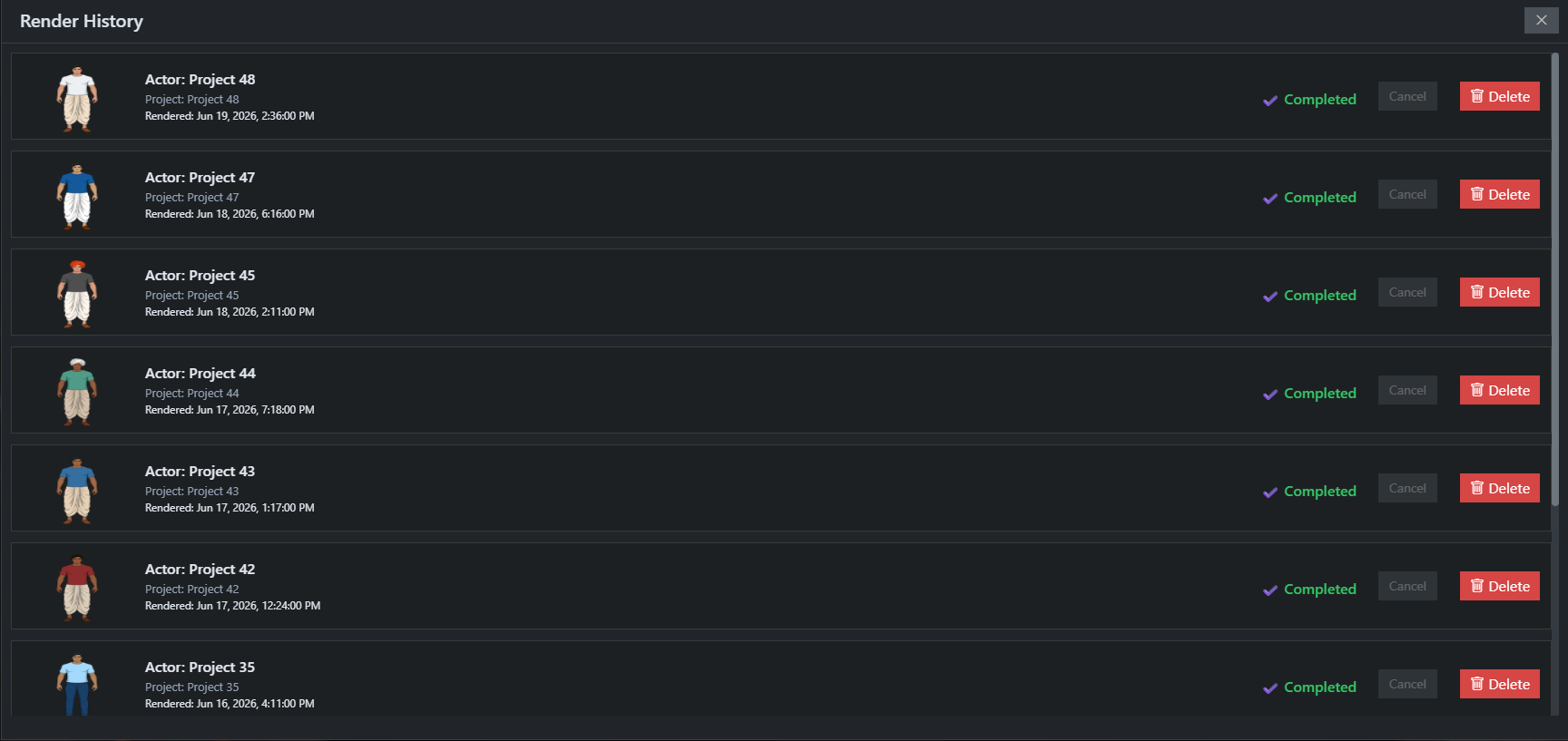
Render Status Tracking
Section titled “Render Status Tracking”Render History allows users to check rendering status.
Possible statuses include:
Completed
Section titled “Completed”The character was rendered successfully.
The actor is available for use inside STPro Animator.
Processing
Section titled “Processing”The rendering operation is still running.
Users should wait until processing is complete.
Failed
Section titled “Failed”The rendering process could not be completed successfully.
Users may need to retry rendering.
Reviewing Rendered Actors
Section titled “Reviewing Rendered Actors”Users can review previously rendered characters to:
- Confirm successful rendering
- Verify character appearance
- Track project progress
- Identify completed assets
This helps maintain organized character workflows.
Generated Pre-Rigged Poses
Section titled “Generated Pre-Rigged Poses”Every successful character render automatically generates five pre-rigged poses.
These poses are designed to help users begin animating immediately inside STPro Animator without requiring additional setup.
Benefits include:
- Faster animation workflows
- Ready-to-use character variations
- Reduced manual rigging work
- Improved production efficiency
The generated poses are included with the rendered actor and become available once rendering is complete.
Actor Availability After Rendering
Section titled “Actor Availability After Rendering”Once rendering is completed successfully:
- The actor appears in Render History
- Five pre-rigged poses are generated automatically
- The actor becomes available in STPro Animator
- The actor can be used in animation projects
Render History serves as a confirmation that rendering was successful.
Tracking Multiple Actors
Section titled “Tracking Multiple Actors”Users creating multiple characters can use Render History to:
- Differentiate actor versions
- Monitor rendering activity
- Review previously created characters
- Maintain organized workflows
This becomes especially useful for larger animation projects.
Render Synchronization
Section titled “Render Synchronization”After rendering completes, synchronization may require a short amount of time.
If a newly rendered actor is not immediately visible inside STPro Animator:
- Wait a few moments
- Refresh the page
- Check Render History again
The actor should appear after synchronization finishes.
Note
If a rendered actor does not appear in STPro Animator immediately, allow some time for processing and synchronization to complete before attempting another render.
Common Issues
Section titled “Common Issues”Actor Not Visible in Animator
Section titled “Actor Not Visible in Animator”Possible causes:
- Rendering still processing
- Synchronization delay
Solutions:
- Wait a few minutes
- Refresh the browser
- Verify render completion in Render History
Missing Render Record
Section titled “Missing Render Record”Possible causes:
- Rendering failed
- Browser interruption
- Temporary synchronization issue
Solutions:
- Refresh the page
- Reopen Render History
- Retry rendering if necessary
Render Still Processing
Section titled “Render Still Processing”Possible cause:
- High server workload
- Large rendering queue
Solution:
- Wait until processing completes
Benefits of Render History
Section titled “Benefits of Render History”Render History provides:
- Render tracking
- Workflow transparency
- Production monitoring
- Actor management support
- Easier project organization
Summary
Section titled “Summary”Summary
Section titled “Summary”The Render History feature allows users to monitor previously rendered actors, verify rendering completion, and review generated character assets. Each successful render produces a character package containing five pre-rigged poses that can be used directly inside STPro Animator, enabling faster and more efficient animation workflows.
Next Step
Section titled “Next Step”Continue to the next documentation section to learn:
- Actor-to-Animator workflow
- Using rendered actors in projects
- Character integration process
- Animation-ready asset management