
Used Items Panel
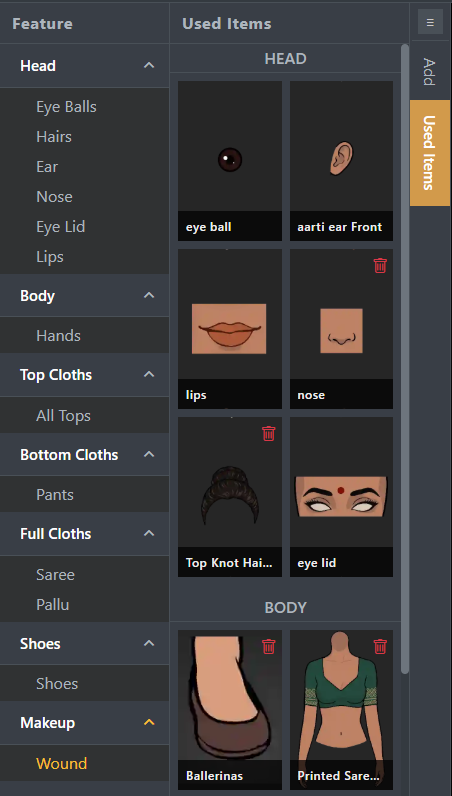
The Used Items Panel in STPro Actor displays all customization items currently applied to the character.
This panel helps users review, track, and manage selected customization options while creating an actor.
The Used Items Panel provides a quick overview of the character configuration without requiring users to navigate through multiple customization categories.
Purpose of the Used Items Panel
Section titled “Purpose of the Used Items Panel”The Used Items Panel helps users:
- Review applied customizations
- Track selected items
- Verify character configuration
- Manage actor appearance efficiently
- Identify active customization choices
Accessing the Used Items Panel
Section titled “Accessing the Used Items Panel”To access the Used Items Panel:
- Open an Actor project.
- Navigate to the actor workspace.
- Locate the Used Items Panel.
- Review all currently applied customization items.
The panel updates automatically as changes are made.
Information Displayed
Section titled “Information Displayed”The Used Items Panel may display selected items from categories such as:
- Head
- Body
- Clothing
- Makeup
- Skin Color
- Pose
Only currently active selections are shown.
Real-Time Updates
Section titled “Real-Time Updates”The Used Items Panel updates automatically whenever users:
- Change a head style
- Select a different body type
- Apply clothing
- Modify makeup
- Change skin colors
- Select a new pose
No manual refresh is required.
Reviewing Character Configuration
Section titled “Reviewing Character Configuration”The Used Items Panel allows users to quickly verify:
- Which items are currently active
- Whether the correct options are applied
- Overall character setup before saving
- Actor readiness before rendering
This helps reduce mistakes during actor creation.
Managing Applied Items
Section titled “Managing Applied Items”Users can use the panel as a reference while editing.
Common actions include:
- Reviewing selected items
- Confirming customization choices
- Comparing actor configurations
- Preparing actors for rendering
Workflow Integration
Section titled “Workflow Integration”The Used Items Panel works alongside:
- Character Customization
- Head Customization
- Body Customization
- Clothing Customization
- Makeup
- Skin Colors
- Pose Controls
It provides a centralized view of all selected customization options.
Benefits of the Used Items Panel
Section titled “Benefits of the Used Items Panel”The Used Items Panel provides:
- Better customization visibility
- Faster actor review
- Improved workflow efficiency
- Easier configuration tracking
- Simplified character management
Best Practices
Section titled “Best Practices”For efficient actor creation:
- Review the Used Items Panel regularly
- Verify selections before saving
- Check active items before rendering
- Ensure character appearance matches project requirements
Summary
Section titled “Summary”The Used Items Panel provides a centralized view of all customization items currently applied to a character. By automatically tracking active selections, it helps users manage character configurations efficiently and prepare actors for saving, rendering, and animation workflows.
Next Step
Section titled “Next Step”Continue to the next documentation section to learn:
- Top Toolbar features
- Save controls
- Preview options
- Actor workspace management